Search results for tag #snac
 boosted
![[?]](https://comam.es/snac/susie.png)
Changed default: for newly created instances, disable_inbox_collection is set to true (see snac(8) for more information). The reason is because it seems to be used for harrasing people.
Changed default: for newly created instances, disable_history is set to true (see snac(8) for more information). The reason is because archived history files don't reflect reality after posts are deleted or modified (they always have been an ugly kludge).
Changed default: in previous versions, posts with a scope of unlisted were shown in public pages and RSS feeds. Now, they are no longer shown. If you want to get back to previous behaviour, use a new toggle in the User Settings section (see snac(1) for more information).
New admin configuration option: if the purge_static value is set to true in server.json, each user's static directory is explored and those files there that are no longer attached to any post or referenced anywhere are deleted. See snac(8) for more information about those cases where you may not want to enable this option.
Allow serving files from subdirectories of the static/ subdirectory (contributed by la_ninpre).
Minor tweak to webfinger code to handle Hubzilla's peculiarities.
Fixed a search case where URLs to GotoSocial statuses were misidentified as accounts.
Accounts that follow you are now marked with a thumb-up emoji, because followers are adorable people.
Fixed some account export errors.
Fixed an incorrect hash in post links.
Show an account's location link in the people page, if they have one.
Mastodon API: Fixed hashtags loosing the link after editing a post, minor tweak in access token processing (contributed by trondd555).
Drop usage of PATH_MAX (contributed by sergiodj).
New Polish translation (contributed by kpm).
Updated German and Czech translations (contributed by zen and pmjv).
If you find #snac useful, please consider buying grunfink a coffee or contributing via LiberaPay.
Fixed some local posts not being shown if the replied post is deleted.
Fixed web UI incorrect links to public posts for some configurations.
Fixed encoding bug in Mastodon-style share links.
Fixed an error that made imposible to leave empty the following hashtags or blocked hashtags from the web UI.
Include post attachments in the RSS feed entries.
Added some OpenBSD-specific documentation (contributed by oxzi).
Fixed some timezones (contributed by matoken).
Fixed some crashes (special thanks to Louis Merlin for helping me with this).
Updated Docker scripts to avoid generating a useless log file.
Fixed several memory leaks, key generation errors and HTML inconsistencies (contributed by dandelions).
Added ostatus.org and FEP-3b86 data to Webfinger objects.
Added a new CONTRIBUTING.md file. Among other guidelines, I explicitly say there that AI contributions are NOT accepted.
snac is now available as a Yunohost app. Thank you very much to Bruno Cesar Rocha for this.
If you find #snac useful, please consider buying grunfink a coffee or contributing via LiberaPay.
![[?]](https://snac.matoken.org/matoken/s/avatar-c563dfcc7dea31d64b24b3aff1a3b746.jpeg)
UTC+9 だと正しそう
もしかしてGMT の + と - が間違っている?
$ grep GMT+9 xs_time.h
{ "GMT+9", -9 },
$ grep UTC+9 xs_time.h
{ "UTC+9", 9 },
$ grep GMT xs_time.h
{ "GMT", 0 },
{ "GMT+1", -1 },
{ "GMT+2", -2 },
{ "GMT+3", -3 },
{ "GMT+4", -4 },
{ "GMT+5", -5 },
{ "GMT+6", -6 },
{ "GMT+7", -7 },
{ "GMT+8", -8 },
{ "GMT+9", -9 },
{ "GMT+10", -10 },
{ "GMT+11", -11 },
{ "GMT+12", -12 },
{ "GMT-1", 1 },
{ "GMT-2", 2 },
{ "GMT-3", 3 },
{ "GMT-4", 4 },
{ "GMT-5", 5 },
{ "GMT-6", 6 },
{ "GMT-7", 7 },
{ "GMT-8", 8 },
{ "GMT-9", 9 },
{ "GMT-10", 10 },
{ "GMT-11", 11 },
{ "GMT-12", 12 },
{ "GMT-13", 13 },
{ "GMT-14", 14 },
boosted![[?]](https://secure.gravatar.com/avatar/38f5f3b575c5eb45cda6aa659bca119ac7a5e16b46565e869d0030e3bd66981d?s=120&d=mm&r=g)
snacのユーザーごとのstaticディレクトリ
snacのための静的ディレクトリをapache2 httpd で設定してカスタム絵文字の設置場所に利用しています. snac でカスタム絵文字を利用 – matoken’s blog 実は設定せずともユーザごとに静的ディレクトリがあるのに気づきました. […] [SENSITIVE CONTENT]
snacのための静的ディレクトリをapache2 httpd で設定してカスタム絵文字の設置場所に利用しています.
実は設定せずともユーザごとに静的ディレクトリがあるのに気づきました.
きっかけはこちら.
Use https://snac.rohrmoser.name/social/marcus/s/readme.txt (i.e. add a /s/ between your account id and the file).
— https://comam.es/snac/grunfink/p/1771335084.798855
${SNAC-URL}/${USER}/s/ の下が使えるようです.
実際に試してみます.
$ cd ${SNAC-DATA}/user/${USER}/static <.>
$ echo test > test <.>
$ w3m -dump_extra https://snac.matoken.org/matoken/s/test | grep ^HTTP/ -A99 <.>
HTTP/1.1 200 OK
Date: Wed, 18 Feb 2026 20:50:37 GMT
Server: Apache/2.4.66 (Debian)
content-type: application/octet-stream
x-creator: snac/2.90
etag: W/”snac-1771444525″
access-control-allow-origin: *
access-control-allow-headers: *
access-control-expose-headers: Link
Content-Security-Policy: script-src ;
content-length: 5
Connection: closetest
ユーザーディレクトリの下の
staticに移動テストファイルを作成
ユーザーディレクトリの下の
s以下の該当ファイルを確認
ということでsnac server の ${SNAC-DATA}/user/${USER}/static 以下に置いたファイルが ${SNAC-URL}/${USER}/s/ 以下で確認できます.
theme でこのディレクトリは利用していましたが,theme 以外のファイルもok なんですね.
環境
$ sudo -u snac ~snac/snac2/snac state ~snac/snac-data
server: snac.matoken.org (snac/2.90)
uptime: 1:11:46:03
job fifo size (cur): 0
job fifo size (peak): 11
thread #0 state: waiting
thread #1 state: waiting
thread #2 state: waiting
thread #3 state: waiting
$ lsb_release -dr
No LSB modules are available.
Description:    Debian GNU/Linux 12 (bookworm)
Release:        12
$ arch
x86_64
boostedMinor tweak to improve signature key retrieving for some Wordpress configurations.
Fixed web UI incorrect links to actor public pages for some configurations.
Fixed mismatch in the accounts being followed number in the public and people pages.
Notifications can be filtered by category (contributed by byte).
Dates are shown adjusted to the account's time zone (contributed by dandelions).
Configurable limit for poll items (contributed by dandelions).
Fixed incorrect scope when editing a post (contributed by dandelions).
Change the strip_exif logic to work with the already existing OpenBSD sandbox (contributed by oxzi).
Mastodon API: Add poll creation (contributed by davidrv00), fixed a voting bug (contributed by davidrv00), added a fix to verify_credentials (contributed by ag-eitilt).
Updated Czech, German, Brazilian Portuguese, Spanish translations (contributed by pmjv, zen, daltux).
If you find #snac useful, please consider buying grunfink a coffee or contributing via LiberaPay.
If disable_emojireact is set to true in server.json, EmojiReacts (incoming and outgoing) are totally disabled.
New command-line option top_ten, that returns the top ten most popular posts by a user (ordered by the sum of likes and boosts) (contributed by aov).
Added a new set of per-user muted words; if a post contains any of them, it's hidden behind a dropdown (contributed by byte).
If an account has a metadata named pronouns, it's shown by the name (contributed by violette).
Mastodon API: children of a post are returned recursively, not just the first level (contributed by violette).
Implemented optional metadata stripping for images and videos using external tools (contributed by Stefano Marinelli).
If you find #snac useful, please consider buying grunfink a coffee or contributing via LiberaPay.
boostedHide EmojiReacts from muted actors and blocked instances.
Sorry for the inconvenience. Bad people creativity always gets me off-guard. Upgrade your snac to this version ASAP, or revert to 2.85.
There will be another release pretty soon with a better solution to delete offending EmojiReacts.
新機能はまだ試していない
https://codeberg.org/grunfink/snac2/src/branch/master/RELEASE_NOTES.md#2-86
$ git checkout 2.86
Previous HEAD position was c741c30 Updated RELEASE_NOTES.
HEAD is now at b84b92d Version 2.86 RELEASED.
$ make
$ ./snac | head -2
snac 2.86 - A simple, minimalistic ActivityPub instance
Copyright (c) 2022 - 2026 grunfink et al. / MIT license
$ sudo -u snac /home/snac/snac2/snac upgrade ~snac/snac-data
05:52:38 OK
$ sudo -u snac /home/snac/snac2/snac httpd ~snac/snac-data
boostedTruncate RSS titles at UTF-8 character boundaries (contributed by lxo).
Link contacts to single-user people pages. Also, user's posts are shown (contributed by lxo).
Added emoji reactions (contributed by violette).
Mastodon API: Fix for some client notifications (contributed by violette), fix for a status visibility error (contributed by fruye).
If the query variable terse of a public post page is set to anything, no header is shown.
Fixed search failures when the query string has any leading blank.
If you find #snac useful, please consider buying grunfink a coffee or contributing via LiberaPay.
boostedsnacとBluesky連携
さくらのナレッジに軽量ActivityPub Server のsnac についての記事を寄稿しました. さくらインターネットのさくらのナレッジにsnacの記事を寄稿 – matoken’s blog ここに書かなかったsnac のことをいくつか書いていこうと思います. 今日はsnac とBluesky 連携について. […] [SENSITIVE CONTENT]

さくらのナレッジに軽量ActivityPub Server のsnac についての記事を寄稿しました.
ここに書かなかったsnac のことをいくつか書いていこうと思います.
今日はsnac とBluesky 連携について.
Bluesky はポストTwitter の一つでAT Protocol を利用した分散型SNS です.とはいえ現時点ではActivityPub ほど分散している感じはしません.
このBluesky とfediverse (snac のActivityPub も含む)とWeb を連携させるブリッジとしてBridgy Fed というサービスがあります.
Bridgy Fed を使ってsnac とBluesky を連携してみます,
Bridgy Fed for the fediverse (@ap.brid.gy) — Bluesky (Bluesky アカウント)
ActivityPub から連携するには https://fed.brid.gy/login で認証後,「Enable」ボタンを押すとなっているのですがログインしてもボタンが見当たりません.Mastodon としてsnac のアカウントを認証したのでなにかAPI の違いや不足があるのかもしれません.
以下のページを見ると別の方法も紹介されています.
if login isn't supported for your fediverse server, search for and follow @bsky.brid.gy@bsky.brid.gy in the fediverse. That account will then follow you back. Accept its follow to make sure your fediverse posts get sent the bridge and make it into Bluesky. You can unfollow it afterward if you want, you'll still stay bridged. (Here's how to disable.)
snac の該当アカウントで @bsky.brid.gy@bsky.brid.gy をfollow します.するとこのアカウントからfollow が返されるので承認すると連携完了です.この後は unfollow しても連携は維持されるそうです.
このときの連携元アカウントが, @[user]@[instance] の場合Bluesky ブリッジアカウントのハンドルは [user].[instance].ap.brid.gy になります.
なにか投稿して確認しましょう.
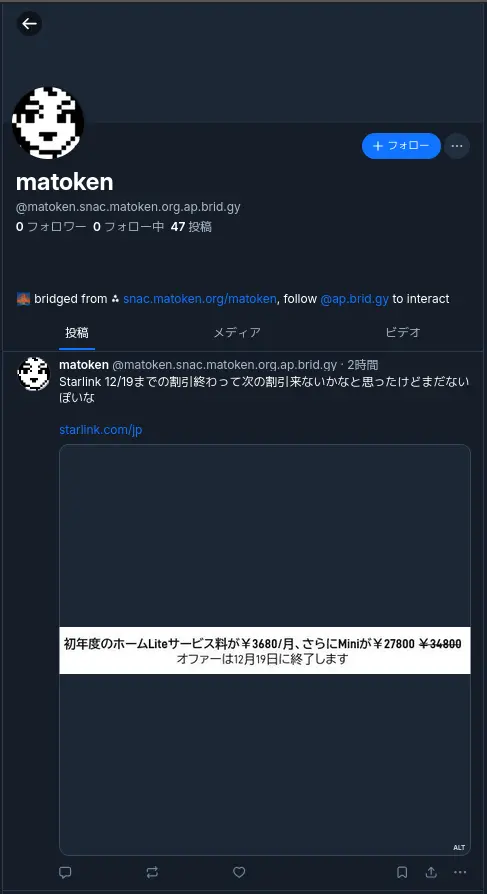
Bridgy Fed は単に投稿を転送するだけでなく返信やlikes, (元の投稿がブリッジされている場合は)repost なども連携されるようです.元の投稿を削除した場合も反映されます.
Which stuff of mine from the fediverse will get bridged?
Once you’ve enabled the bridge, anything that’s fully public and interacts with Bluesky users. This includes your posts, replies, likes, and reposts if the original post was bridged. Posts on Bluesky are limited to 300 characters, so longer posts from the fediverse are truncated and ellipsized. Hashtags, links, link previews, images, videos, and even alt text are also included.
— Which stuff of mine from the fediverse will get bridged?
ブリッジアカウントの削除を行いたい場合は,Bridgy Fedボットユーザー( @bsky.brid.gy@bsky.brid.gy )をブロックすることで削除できるようです.
If you’re on the fediverse or Bluesky, and you’ve opted in but now want to opt out, block the Bridgy Fed bot user for the network you want to opt out of. For example, on the fediverse, block @bsky.brid.gy@bsky.brid.gy. On Bluesky, block @ap.brid.gy.
(However, if you’re on a Pixelfed instance, DM the word stop to @bsky.brid.gy@bsky.brid.gy instead. Pixelfed doesn’t yet send the ActivityPub Block activity, so blocking won’t work. Hopefully they’ll fix that soon!)
If you’re on the web, email us from an address at your web site’s domain to show that you own it, or you can put the text #nobridge in the profile on your home page and then update your profile on your user page.
Once you’ve done this, Bridgy Fed will deactivate your bridged profile in that network, and it will no longer bridge any of your posts or interactions there.
You can undo this later and reactivate bridging for your account, but depending on the network, not everything will be perfectly restored. For example, when you disable bridging into the fediverse, the bridged fediverse account is deleted and all followers are disconnected. If you later re-enable it, fediverse users will have to search for your account by address manually to find and follow it again.
boostedsnacの自動投稿機能
さくらのナレッジに軽量ActivityPub Server のsnac についての記事を寄稿しました. さくらインターネットのさくらのナレッジにsnacの記事を寄稿 – matoken’s blog ここに書かなかったsnac のことをいくつか書いていこうと思います. 今日はsnac のbot 向け投稿機能について. […] [SENSITIVE CONTENT]
さくらのナレッジに軽量ActivityPub Server のsnac についての記事を寄稿しました.
ここに書かなかったsnac のことをいくつか書いていこうと思います.
今日はsnac のbot 向け投稿機能について.
bot やアナウンスなど向けのアカウントで自動投稿をしたいことがあります.
例えばいま考えているのはCalDav から今日のイベントを投稿するアカウント.現在はWebhook 経由でDiscord にpost したりしています.
snac でもいくつか自動投稿する機能があります.
Implementing post bots
snac makes very easy to post messages in a non-interactive manner. This example posts a string:
uptime | snac note $SNAC_BASEDIR $SNAC_USER –
You can setup a line like this from a crontab(5) or similar. Take note that you need a) command-line access to the same machine that hosts the snac instance, and b) write permissions to the storage directories and files.
You can also post non-interactively using the Mastodon API and a command-line http tool like curl(1) or similar. This has the advantage that you can do it remotely from any host, anywhere; the only thing you need is an API Token. This is an example:
curl -X POST https://$SNAC_HOST/api/v1/statuses \
–header “Authorization: Bearer ${TOKEN}” -d “status=$(uptime)”You can obtain an API Token by connecting to the following URL:
— man(1) より
note basedir uid text [file file ... [-r inReplyTo [-d YYYYmmddHHMMSS]]]
        Enqueues a Create + Note message to all followers. If the text argument is -e, the external editor defined by  the  EDITOR  environment  variable
        will  be invoked to prepare a message; if it's - (a lonely hyphen), the post content will be read from stdin.  The rest of command line arguments
        are treated as media files to be attached to the post. The LANG environment variable (if defined) is used as the post language. An  optional  URL
        to  a  Fediverse post, prefixed by -r, can be specified for this note to be a reply to. If a date in YYYYmmddHHMMSS format is followed by -d, the
        note is scheduled for that moment instead of immediately posted (this date must be in the same timezone the user has configured in the web UI).
note_unlisted basedir uid text [file file ... [-r inReplyTo [-d YYYYmmddHHMMSS]]] Like the previous one, but creates an "unlisted" (or "quiet public") post.note_mention basedir uid text [file file ... [-r inReplyTo [-d YYYYmmddHHMMSS]]] Like the previous one, but creates a post only for accounts mentioned in the post body.block basedir instance_url
— man(1) より
snac note コマンドでの投稿
snac の動作している環境で実行できるのであればお手軽なsnac のnote コマンドがあります.
man(1) にある例を真似してみます.
uptime | snac note $SNAC_BASEDIR $SNAC_USER –
$ uptime | pee "./snac note snac-test test -" cat
 23:32:36 up 4 days, 10:17,  1 user,  load average: 1.56, 1.90, 1.69
23:32:36 [test] enqueue_message http://127.0.0.1:8001/test/p/1766154756.511450/Create
8       /�
投稿を確認するとこんな感じ.

日本語もそのままでok でした.

pfetch を流し込んでみるとこんな感じで整形を考えないとダメそう.
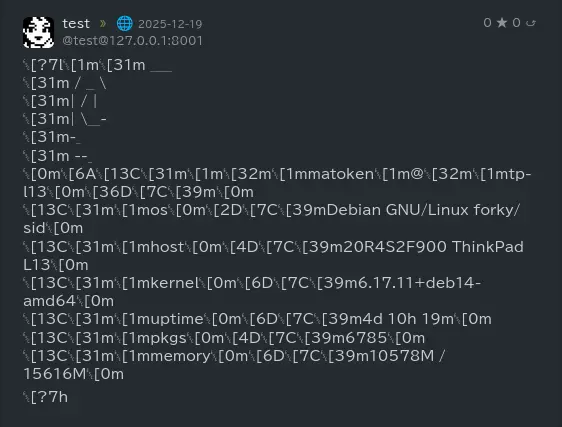
curl を使ってAPI 経由で投稿
こちらは一般的なネットワーク経由でリモートで投稿可能な方法です.token を入手してcurl コマンドで投稿します.
まず以下のようなURL でtoken を取得します.
以下のような画面になるので対象アカウントの情報を入手します.
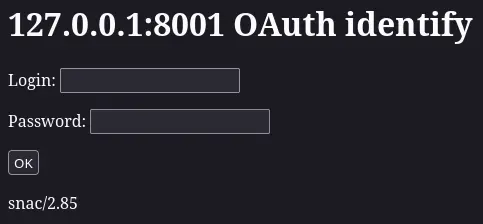
以下のようなトークンが取得できるのでメモします.
1f3ea50e9ab7cc85f5ff01b8f43fb1ae
後はcurl などで以下のようにPOST.
json で返り値が帰ってきます.
$ curl -X POST http://127.0.0.1:8001/api/v1/statuses --header "Authorization: Bearer 1f3ea50e9ab7cc85f5ff01b8f43fb1ae" -d "status=$(uptime)"
{
    "id": "1766155742b0f5ed692a273ff5b6ef59b696ddde76",
    "uri": "http://127.0.0.1:8001/test/p/1766155742.788170",
    "url": "http://127.0.0.1:8001/test/p/1766155742.788170",
    "account": {
        "id": "488d5ffe15e31aa0be5002853e8006f7",
        "username": "test",
        "display_name": "test",
        "discoverable": true,
        "group": false,
        "hide_collections": false,
        "indexable": true,
        "noindex": false,
        "roles": [
        ],
        "acct": "test@127.0.0.1:8001",
        "created_at": "2025-11-14T19:38:38Z",
        "last_status_at": "2025-12-19",
        "bot": false,
        "note": "<br>",
        "url": "http://127.0.0.1:8001/test",
        "uri": "http://127.0.0.1:8001/test",
        "avatar": "http://127.0.0.1:8001/susie.png",
        "avatar_static": "http://127.0.0.1:8001/susie.png",
        "header": "",
        "header_static": "",
        "emojis": [
        ],
        "locked": false,
        "followers_count": 0,
        "following_count": 0,
        "statuses_count": 0,
        "fields": [
        ]
    },
    "created_at": "2025-12-19T14:49:02.000Z",
    "content": "23:49:02 up 4 days, 10:34,  1 user,  load average: 1.48, 1.57, 1.68<br>",
    "visibility": "public",
    "sensitive": false,
    "spoiler_text": "",
    "media_attachments": [
    ],
    "mentions": [
    ],
    "tags": [
    ],
    "emojis": [
    ],
    "favourites_count": 0,
    "favourited": false,
    "reblogs_count": 0,
    "reblogged": false,
    "replies_count": 0,
    "in_reply_to_id": null,
    "in_reply_to_account_id": null,
    "reblog": null,
    "card": null,
    "language": "en",
    "filtered": [
    ],
    "muted": false,
    "text": " 23:49:02 up 4 days, 10:34,  1 user,  load average: 1.48, 1.57, 1.68",
    "edited_at": null,
    "poll": null,
    "bookmarked": false,
    "pinned": false
} boostedsnacの通知について
さくらのナレッジに軽量ActivityPub Server のsnac についての記事を寄稿しました. さくらインターネットのさくらのナレッジにsnacの記事を寄稿 – matoken’s blog ここに書かなかったsnac のことをいくつか書いていこうと思います. 今日はsnac の通知について. […] [SENSITIVE CONTENT]
さくらのナレッジに軽量ActivityPub Server のsnac についての記事を寄稿しました.
ここに書かなかったsnac のことをいくつか書いていこうと思います.
今日はsnac の通知について.
snac の通知は以下のように「notifications」の横に数字で通知されます.「notifications」リンクをクリックすることで詳細が表示されます.

しかしこの通知はsnac のページが読み込まれたタイミングにならないと通知がわかりません.
しかし代替の通知がいくつか実装されています.これらを利用することでほぼリアルタイムな通知が可能となります.
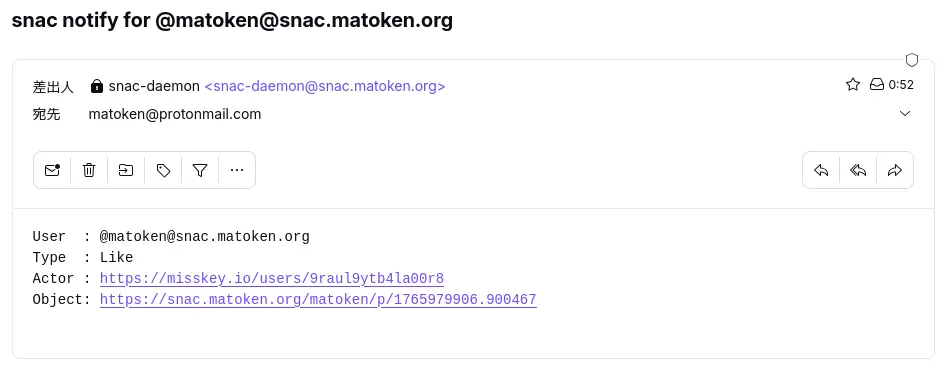
一般的なe-mail です.サーバーのメールシステムが設定済であればユーザーの「User Settings…」から「Email address for notifications:」に宛先のe-main address を入力するることで利用可能です.
サーバーのメールシステムの設定がされていなかったり,外部のメールシステムを利用したい場合 server.json の以下の項目を設定することでもメールが送信できます.
Email address for notifications
        If this field is not empty, an email message will be sent to this address whenever a post written by you is liked, boosted or replied to.
— snac(1)より
smtp_url Since version 2.76, email notifications can be sent via direct connection to an SMTP server instead of the traditional behaviour of piping the mes‐ sage to /usr/sbin/sendmail. Set this value to the SMTP url to be used for sending email notifications (for example, smtp://localhost). It may in‐ clude a port number if it's not running on the usual one, like in smtp://mail.example.com:587.smtp_usersmtp_password To be filled if the SMTP server defined by the previous directive needs credentials.
— snac(8)より
Telegram で通知
インスタントメッセージアプリケーションのTelegram にも対応しています.ただ,Telegram bot を作成して利用する必要があるので期設定が少し初面倒です.
Telegram notifications
        To  enable  notifications  via Telegram, fill the two provided fields (Bot API key and Chat id). You need to create both a Telegram channel and a
        bot for this; the process is rather cumbersome but it's documented everywhere. The Bot API key is a long string of  alphanumeric  characters  and
        the chat id is a big, negative number.
— snac(1)より
以前Telegram bot をNextcloud のTOTP の通知設定に利用するために書いたエントリがあります.
Telegram bot が作成できたら各ユーザの「User Settings…」の「Telegram notifications (bot key and chat id):」に設定することで利用できます.
ntfy で通知
OSS でセルフホスト可能でウェブブラウザやスマートフォンに通知ができるntfy というサービスがあります.これを利用してsnac の通知を行うことも可能です.
ntfy notifications
        To  enable  notifications  via  ntfy  (both self-hosted or standard ntfy.sh server), fill the two provided fields (ntfy server/topic and, if pro‐
        tected, the token).  You need to refer to the https://ntfy.sh web site for more information on this process.
— snac(1)より
セルフホスト可能ですが,とりあえずntfy.sh を利用して試すと良さそうです.
「User Settings…」の「ntfy notifications (ntfy server and token):」に設定することで通知できるようになります.
Webhook で通知
色々なサービスが対応しているWebhook も利用可能です.
Notify webhook
        If this is set to an URL, an HTTP POST will be sent to it whenever a new notification happens (see the 'Webhook for notifications' section  below
        for more information).
— snac(1)より
例えばDiscord であれば,「チャンネルの編集」→「連携サービス」→「ウェブフックを作成」で生成されるURL を利用して通知できます.
これを「User Settings…」の「Notify webhook:」に入力することで通知可能です.
mastodon アプリケーションでの通知
snac はmastodon API に対応しています.そのためmastodon アプリケーションが利用可能です.
mastodon アプリケーションの通知機能を使って通知を受けることが可能です.
boostedsnacのthemeを設定
さくらのナレッジに軽量ActivityPub Server のsnac についての記事を寄稿しました. さくらインターネットのさくらのナレッジにsnacの記事を寄稿 – matoken’s blog ここに書かなかったsnac のことをいくつか書いていこうと思います. 今日はsnac のtheme 変更. […] [SENSITIVE CONTENT]
さくらのナレッジに軽量ActivityPub Server のsnac についての記事を寄稿しました.
ここに書かなかったsnac のことをいくつか書いていこうと思います.
今日はsnac のtheme 変更.
snac はCSS ファイルを編集することでテーマを設定することが出来ます.
CSS ファイルは2種類あり,インスタンス全体のスタイルを設定する, {basedir}/style.css と,各ユーザー用のプライベートCSSファイルの {basedir}/user/{ユーザー名}}/static/style.css です.
Tip
手元のsnac 2.8.5 で試したところ,各ユーザーのプライベートCSSファイルはログインした状態でないと効かないようです.
つまり,各ユーザーの公開ページはグローバル設定が反映されます.
自分で設定しなくても, README.md の Incredibly awesome CSS themes for snac 部分にいくつかのtheme が紹介されているのでこれを使わせてもらったりそれを元にカスタマイズするのでも良さそうです.
$ grep -A5 'Incredibly awesome CSS themes for snac' README.md## Incredibly awesome CSS themes for snac- [A compilation of themes for snac (by Во )](https://codeberg.org/voron/snac-style).- [A cool, elegant theme (by Haijo7)](https://codeberg.org/Haijo7/snac-custom-css).- [A terminal-like theme (by Tetra)](https://codeberg.org/ERROR404NULLNOTFOUND/snac-terminal-theme).
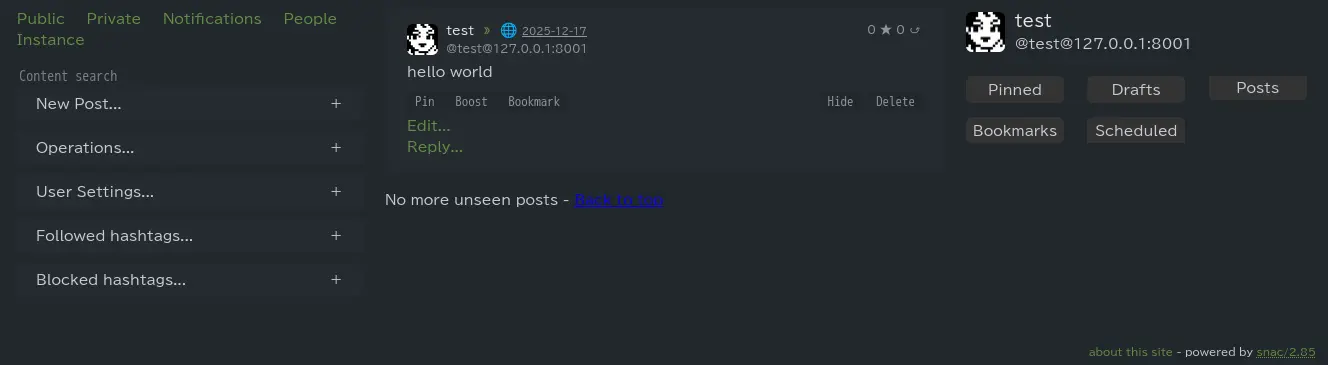
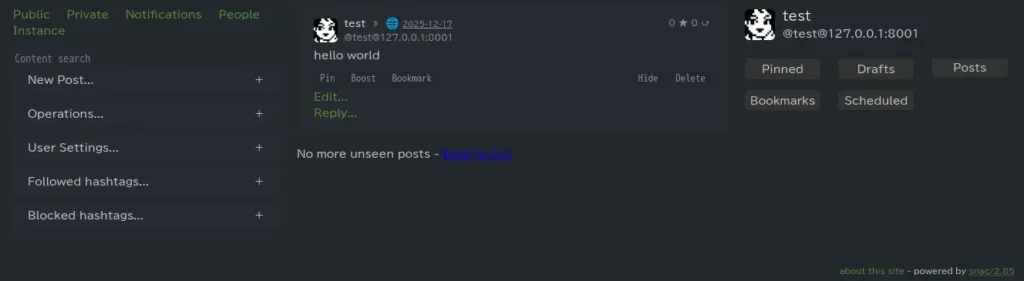
以下は Pika というtheme を設定した例です.3ペインになり,PC等の横長画面での操作性が良さそうです.
Alt...
snac theme pika
boostedsnacのWelcome pageを設定ファイルでカスタマイズ
さくらのナレッジに軽量ActivityPub Server のsnac についての記事を寄稿しました. さくらインターネットのさくらのナレッジにsnacの記事を寄稿 – matoken’s blog ここに書かなかったsnac のことをいくつか書いていこうと思います. 今日はsnac でのWelcome pageのカスタマイズについてその2. 以前のカスタマイズではhtml ファイルの書き換えを行いましたが今回は設定ファイルでの書き換えです. snacのWelcome pageのhtmlファイルカスタマイズ – matoken’s blog […] [SENSITIVE CONTENT]
さくらのナレッジに軽量ActivityPub Server のsnac についての記事を寄稿しました.
ここに書かなかったsnac のことをいくつか書いていこうと思います.
今日はsnac でのWelcome pageのカスタマイズについてその2.
以前のカスタマイズではhtml ファイルの書き換えを行いましたが今回は設定ファイルでの書き換えです.
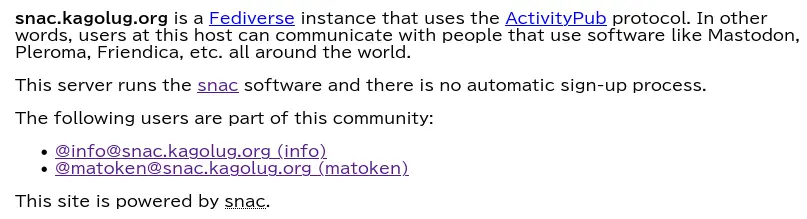
snac のtop page は以下のような挨拶ページが表示されます. greeting.html ファイルを書き換えることでこのページをカスタマイズ出来ますが,他にもサーバー設定ファイルの server.json でもカスタマイズ項目があります.
$ w3m -dump https://snac.kagolug.org/snac.kagolug.org is a Fediverse instance that uses the ActivityPub protocol. Inother words, users at this host can communicate with people that use softwarelike Mastodon, Pleroma, Friendica, etc. all around the world.This server runs the snac software and there is no automatic sign-up process.The following users are part of this community: @info@snac.kagolug.org (info) @matoken@snac.kagolug.org (matoken)This site is powered by snac.
show_instance_timeline これを true に設定するとWelcome page に最新のユーザーが投稿したタイムラインが表示されるようになります.
また,以下の設定項目が設定されていた場合それも表示されます.
admin_email
インスタンス管理者の電子メールアドレス
admin_account
インスタンス管理者のアカウント
title
インスタンスのタイトル
short_description
インスタンスに対する短い説明
short_description_raw
short_description を生の文字列として解釈するか,HTML に変換するか
例えばこの様に設定すると,
$ grep -A5 show_instance_timeline snac-data/server.json "show_instance_timeline": true, "admin_email": "", "admin_account": "matoken", "title": "🐈🐈🐈", "short_description": "matokenの個人ActivityPub インスタンスです.", "short_description_raw": false,
こんな感じになりました.
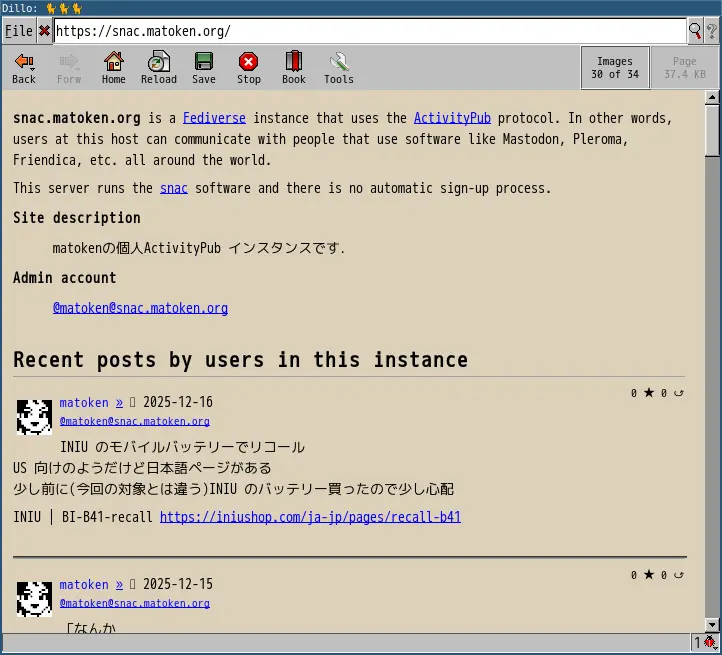
注意点として,show_instance_timeline を true にすると greeting.html は無視されるようです.用途や好みに合わせてどちらかを利用する感じでしょうか.
boostedsnacでのSPAM対策
さくらのナレッジに軽量ActivityPub Server のsnac についての記事を寄稿しました. さくらインターネットのさくらのナレッジにsnacの記事を寄稿 – matoken’s blog ここに書かなかったsnac のことをいくつか書いていこうと思います. 今日はsnac でのSPAM 対策について. […] [SENSITIVE CONTENT]
さくらのナレッジに軽量ActivityPub Server のsnac についての記事を寄稿しました.
ここに書かなかったsnac のことをいくつか書いていこうと思います.
今日はsnac でのSPAM 対策について.
SPAM が来ないに越したことはありませんがActivityPub でも偶に見かけます.もしSPAM が来るときのことを考えて対策を確認しておきます.
snac では2つの対策があるようです.
SPAM Mitigation There have been some SPAM attacks on the Fediverse and, as too many instances and server implementations out there still allow automatic account creation, it will only get worse. snac includes some (not very strong) tools for try‐ ing to survive the SPAM flood that will eventually happen.The min_account_age field in the main configuration file allows setting a minimum age (in seconds) to consider too recently created accounts suspicious of being a potential source of SPAM. This is a naïve assumption, because spam‐mers can create accounts, let them dormant for a while and then start to use them. Also, some ActivityPub implementations don't even bother to return a creation date for their accounts, so this is not very useful.From version 2.50, post content can be filtered out by regular expressions. These weapons of mass destruction can be written into the filter_reject.txt file in the server base directory, one per line; if this file exists, allposts' content will be matched (after being stripped of HTML tags) against these regexes, one by one, and any match will make the post to be rejected. Use lower case, the regex will be case insensitive by default. If you don'tknow about regular expressions, don't use this option (or learn about them inw some tutorial, there are gazillions of them out there), as you and your users may start missing posts. Also, given that every regular expression imple‐mentation supports a different set of features, consider reading the documentation about the one implemented in your system.
— snac(8) より
アカウント作成から日の浅いアカウントを拒否
1つ目はメイン設定ファイルの server.json で設定できる min_account_age で,投稿を受け付けるアカウントが作成されてからの時間が設定できます.
ただし,SPAM アカウントを作成して寝かせてから運用したり,アカウントの作成日を返さない実装もあるらしいのであまり役に立たないようです.
既定値は 0 になっています.
$ jq .min_account_age server.json0
投稿内容を正規表現でフィルタリング
2つめは投稿内容を正規表現でフィルタリングできるようです.snac データディレクトリに filter_reject.txt を用意してこのファイル中に1行ずつ記述できるようです.これにより全ての投稿をHTML タグを取り除いた後正規表現と1つずつ照合され一致する投稿は拒否されます.
正規表現なのでテストを十分して設定したほうが良さそうです.
Reverse proxy やFirewall などsnac の外で対策も考えられます.その他以下のようなものもあるようです.e-mail もこんな感じで多段にしたりしますね.そうなるとReceived のようなものが見たいなと思ったりも.
boostedsnacのrobots.txt
さくらのナレッジに軽量ActivityPub Server のsnac についての記事を寄稿しました. さくらインターネットのさくらのナレッジにsnacの記事を寄稿 – matoken’s blog ここに書かなかったsnac のことをいくつか書いていこうと思います. 今日はsnac でのrobots.txt について. […] [SENSITIVE CONTENT]

さくらのナレッジに軽量ActivityPub Server のsnac についての記事を寄稿しました.
ここに書かなかったsnac のことをいくつか書いていこうと思います.
今日はsnac でのrobots.txt について.
検索エンジンで「site:snac.kagolug.org」のように検索してみると何も出てきません.運用開始からそう時間が経っていないからかな?と思いつつ念の為 robots.txt を確認するとこんな感じで全て拒否るすようになっていました.
$ w3m -dump https://snac.kagolug.org/robots.txtUser-agent: *Disallow: /
source を確認すると httpd.c の中でハードコーディングされているようです.
$ grep -n -A5 robots.txt httpd.c321: if (strcmp(q_path, "/robots.txt") == 0) {322- status = HTTP_STATUS_OK;323- *ctype = "text/plain";324- *body = xs_str_new("User-agent: *\n"325- "Disallow: /\n");326- }snac の設定でどうにかできればいいですが恐らく無理.ISSUE を探すと以下のものが.404エラーが邪魔なので用意しているだけでカスタマイズしたい人は前段のhttp proxy でルールを追加する感じのようです.
ISSUE を立てた方はnginx でカスタムrobots.txt を返すようにしているようです.
Actually, I am able to work around this by returning a custom robots.txt with nginx:
location = /robots.txt {return 200 'User-agent: FediFetcher\nAllow: /\nUser-agent: *\nDisallow: /\n';}
自分の環境はApache2 httpd ですが同じような設定はできるので設定してみます.
Apache2 httpd のAlias でrobots.txt を設定
以前Nitter を公開していたときにもやっていたのでこれを参考に設定します.
Apache2 httpd のsnac 部分の設定を以下のように修正しました.これでLinux ファイルシステム内の /var/lib/snac2/robots.txt が /robots.txt になるはずです.
$ sudo git diff /etc/apache2/sites-available/011-snac.kagolug.org.confdiff --git a/apache2/sites-available/011-snac.kagolug.org.conf b/apache2/sites-available/011-snac.kagolug.org.confindex f5b5c7f..7bb72c1 100644--- a/apache2/sites-available/011-snac.kagolug.org.conf+++ b/apache2/sites-available/011-snac.kagolug.org.conf@@ -58,6 +58,11 @@ </Location> Alias /static /var/www/static+ Alias /robots.txt /var/lib/snac2/robots.txt+ <Location "/robots.txt">+ ProxyPass !+ Require all granted+ </Location> # Possible values include: debug, info, notice, warn, error, crit, # alert, emerg.
設定を確認してから反映します.
$ sudo apache2ctl configtest$ sudo systemctl reload apache2
このファイルが,
$ sudo -u www-data cat /var/lib/snac2/robots.txtUser-agent: *Allow: /
/robots.txt に反映されました.
$ w3m -dump https://snac.kagolug.org/robots.txtUser-agent: *Allow: /
これで各種bot からのアクセスが許可されました.
source 書き換え
source からbuild している環境ではsource 書き換えでもrobots.txt をカスタマイズできました.でもアップデートのたびにパッチを当てるのは面倒なのでやはりproxy で設定するほうが良さそうです.
robots.txt を無くす(404 エラーがたくさんなのであまり良く無さそう)
$ git diff httpd.cdiff --git a/httpd.c b/httpd.cindex a8cd849..976fdd6 100644--- a/httpd.c+++ b/httpd.c@@ -318,13 +318,6 @@ int server_get_handler(xs_dict *req, const char *q_path, *body = xs_json_dumps(j, 4); } else- if (strcmp(q_path, "/robots.txt") == 0) {- status = HTTP_STATUS_OK;- *ctype = "text/plain";- *body = xs_str_new("User-agent: *\n"- "Disallow: /\n");- }- else if (strcmp(q_path, "/style.css") == 0) { FILE *f; xs *css_fn = xs_fmt("%s/style.css", srv_basedir);$ w3m -dump https://snac.matoken.org/robots.txt404 Not Found (snac/2.85)
全て許可に書き換え
$ git diff httpd.cdiff --git a/httpd.c b/httpd.cindex a8cd849..c0bcaef 100644--- a/httpd.c+++ b/httpd.c@@ -322,7 +322,7 @@ int server_get_handler(xs_dict *req, const char *q_path, status = HTTP_STATUS_OK; *ctype = "text/plain"; *body = xs_str_new("User-agent: *\n"- "Disallow: /\n");+ "Allow: /\n"); } else if (strcmp(q_path, "/style.css") == 0) {$ w3m -dump https://snac.matoken.org/robots.txtUser-agent: *Allow: /
boostedsnacのWelcome pageのカスタマイズ
さくらのナレッジに軽量ActivityPub Server のsnac についての記事を寄稿しました. さくらインターネットのさくらのナレッジにsnacの記事を寄稿 – matoken’s blog ここに書かなかったsnac のことをいくつか書いていこうと思います. 今日はsnac でのWelcome pageのカスタマイズについて. […] [SENSITIVE CONTENT]
さくらのナレッジに軽量ActivityPub Server のsnac についての記事を寄稿しました.
ここに書かなかったsnac のことをいくつか書いていこうと思います.
今日はsnac でのWelcome pageのカスタマイズについて.
snac のtop page は以下のような挨拶ページが表示されます.このページをカスタマイズしてみます.
$ w3m -dump https://snac.kagolug.org/snac.kagolug.org is a Fediverse instance that uses the ActivityPub protocol. Inother words, users at this host can communicate with people that use softwarelike Mastodon, Pleroma, Friendica, etc. all around the world.This server runs the snac software and there is no automatic sign-up process.The following users are part of this community: @info@snac.kagolug.org (info) @matoken@snac.kagolug.org (matoken)This site is powered by snac.
このページは greeting.html を読み込んでいるようです.
greeting.html
<!DOCTYPE html><html><head><meta name="viewport" content="width=device-width, initial-scale=1"/><link rel="icon" type="image/x-icon" href="https://%host%/favicon.ico"/><style>*{color-scheme:light dark}body{margin:auto;max-width:50em}</style><title>Welcome to %host%</title></head><body><p><b>%host%</b> is a <a href="https://en.wikipedia.org/wiki/Fediverse">Fediverse</a> instance that uses the <a href="https://en.wikipedia.org/wiki/ActivityPub">ActivityPub</a> protocol. In other words, users at this host can communicate with people that use software like Mastodon, Pleroma, Friendica, etc. all around the world.</p><p>This server runs the <a href="https://comam.es/what-is-snac">snac</a> software and there is no automatic sign-up process.</p><p>The following users are part of this community:</p>%userlist%<p>This site is powered by <abbr title="Social Networks Are Crap">snac</abbr>.</p></body></html>例えば日本語にしたり,ユーザーリストを隠したりといったカスタマイズが出来ます.このhtml ファイルを保存した時点で反映されます.
$ w3m -dump https://snac.kagolug.org/snac.kagolug.orgはActivityPubプロトコルを利用したFediverseインスタンスです.このホストのユーザーは世界中のMastodon, Pleroma, Friendica, などのソフトウェアを利用している人々とコミニュケーションを取ることが出来ます.このサーバーはsnac ソフトウェアを利用しています.自動登録プロセスはありません.以下のユーザーがこのコミュニティに参加しています: @info@snac.kagolug.org (info) @matoken@snac.kagolug.org (matoken)This site is powered by snac.
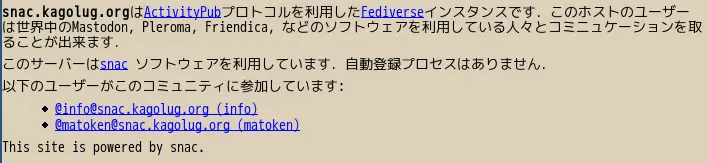
今回とりあえず日本語にしましたが,LUG の説明なども入れたいところです.
boostedDebian 13 trixieでbackportsを使い最新のsnacを利用
さくらのナレッジに軽量ActivityPub Server のsnac についての記事を寄稿しました. さくらインターネットのさくらのナレッジにsnacの記事を寄稿 – matoken’s blog ここに書かなかったsnac のことをいくつか書いていこうと思います. 今日はDebian trixie backports のsnac パッケージを使うよう設定してみます. […] [SENSITIVE CONTENT]
さくらのナレッジに軽量ActivityPub Server のsnac についての記事を寄稿しました.
ここに書かなかったsnac のことをいくつか書いていこうと思います.
今日はDebian trixie backports のsnac パッケージを使うよう設定してみます.
Debian でのsnac2 パッケージのバージョン
snac2 はDebian パッケージになっています.しかし,stable のDebian 13 trixie のsnac2 パッケージのバージョンは 2.75-2 で少し古いバージョンです.
stable-backports のパッケージのバージョンは現在の上流の最新と同じ 2.85 なのでこれを利用してみます.
$ rmadison snac2| grep -v debugsnac2 | 2.75-2~bpo12+1 | oldstable-backports | source, amd64, arm64, armel, armhf, i386, mips64el, mipsel, ppc64el, s390xsnac2 | 2.75-2 | stable | source, amd64, arm64, armel, armhf, i386, ppc64el, riscv64, s390xsnac2 | 2.84-3~bpo13+1 | stable-backports | source, riscv64snac2 | 2.85-1~bpo13+1 | stable-backports | source, amd64, arm64, armel, armhf, i386, ppc64el, s390xsnac2 | 2.85-1 | testing | source, amd64, arm64, armhf, i386, ppc64el, riscv64, s390xsnac2 | 2.85-1 | unstable | source, amd64, arm64, armhf, i386, ppc64el, riscv64, s390x
Debian 13 trixie に backports を設定
Debian backports はDebian stable で一部のtesting パッケージを利用できるよう調整されたもので対応したパッケージであればstable より新しいバージョンが利用できます.
これを利用するためにはbackports 情報を sources.list に追加する必要があります.
ここでは公式ドキュメントと同じ /etc/apt/sources.list.d/debian-backports.sources としてファイルを作成しました.
/etc/apt/sources.list.d/debian-backports.sources を作成
Types: deb deb-srcURIs: http://deb.debian.org/debianSuites: trixie-backportsComponents: mainEnabled: yesSigned-By: /usr/share/keyrings/debian-archive-keyring.gpg
続いてパッケージ情報をbackports を含む最新状態にします.
パッケージ情報更新
$ sudo apt update
backports の snac を導入
backpots のパッケージは通常のインストールでは導入されません.backports のパッケージを導入するにはパッケージ名に /trixie-backports を付けて導入します.
$ sudo apt install snac2/trixie-backports
もしくは -t trixie-backports を付けて導入すると不足した依存関係も導入されるようです.
$ sudo apt install -t trixie-backports snac2
$ dpkg-query -W snac2snac2 2.85-1~bpo13+1$ snac versionsnac 2.85 - A simple, minimalistic ActivityPub instanceCopyright (c) 2022 - 2025 grunfink et al. / MIT licenseupgrade {basedir} Upgrade to a new version導入されたbackports パッケージは通常と同じ優先度100に固定されるので導入後はいつもの apt upgrade でbackports パッケージも更新されます.つまり通常の運用で大丈夫です.
snac アップグレード操作
snac のバージョンアップ時にディスク構成が変わることがあり,その場合snac が起動しないようです.その場合snac の upgrade コマンドを実行する必要があるようです.
自分は念の為毎回実行しています.
snac(8)より
Upgrading to a new version Sometimes, the data storage disk layout changes between versions. If there is such a change, snac will refuse to run and require an upgrade. Do this by runningsnac upgrade $HOME/snac-dataTake special care to execute this upgrade operation without any snac processes serving on the same folder. You can break everything. I know this because Tyler knows this.
$ snac | grep upgradeupgrade {basedir} Upgrade to a new versionupgrade コマンドはデーモンが起動していない状態で実行する必要があるので一旦snac を停止してから実行,その後snac を起動します.
$ sudo service snac2 stop (1)$ sudo -u debian-snac snac upgrade /var/lib/snac2/ (2)19:45:50 Linux sandbox not compiled in19:45:50 OK$ sudo service snac2 start (3)$ w3m -dump https://snac.kagolug.org/info | tail -1 (4)about this site - powered by snac/2.83
snac 停止
snac upgrade
snac 起動
バージョン確認
という感じでDebian stable でも最新のsnac が利用できています.一旦設定すると通常のDebian パッケージ更新操作で追従してくれるので運用もいつもと変わりません.更新タイミングも公式と見比べると結構すぐ対応してくれているようです.
boostedsnac でカスタム絵文字を利用
さくらのナレッジに軽量ActivityPub Server のsnac についての記事を寄稿しました. さくらインターネットのさくらのナレッジにsnacの記事を寄稿 – matoken’s blog ここに書かなかったsnac のことをいくつか書いていこうと思います. 今日はカスタム絵文字について. […] [SENSITIVE CONTENT]
さくらのナレッジに軽量ActivityPub Server のsnac についての記事を寄稿しました.
ここに書かなかったsnac のことをいくつか書いていこうと思います.
今日はカスタム絵文字について.
ActivityPub 各インスタンスでよく使われているカスタム絵文字というものがあります.misskey.io なんかでは特に多用されているようです.
snac もカスタム絵文字に対応しています.
既定値で設定されているものとして例えばtoot 本文中に :-) と入力することで「🙂」が, :beer: と入力することで「🍺」が表示されます.他に :shrug2: で「¯\_(ツ)_/¯」なんでものも.でもこのあたりのUnicode絵文字などは日本語入力環境があるとあまり有り難みは感じなそうです.でも画像ファイルも利用できます.
自分で用意した絵文字を追加してみましょう.
カスタム絵文字を追加するにはsnac のデータディレクトリにある emojis.json を編集することでカスタマイズできます.
emojis.json の既定値はこんな感じです.
toot 本文中に記述するkey と,実際に評される値の組み合わせです.key は保管性を保つために : で囲むことが推奨されています.値は以下では数値文字参照及び文字列ですが,URL を指定することも出来ます.
{ ":-)": "🙂", ":-D": "😀", "X-D": "😆", ";-)": "😉", "B-)": "😎", ">:-(": "😡", ":-(": "😞", ":-*": "😘", ":-/": "😕", "8-o": "😲", "%-)": "🤪", ":_(": "😢", ":-|": "😐", "<3": "❤️", ":facepalm:": "🤦", ":shrug:": "🤷", ":shrug2:": "¯\\_(ツ)_/¯", ":eyeroll:": "🙄", ":beer:": "🍺", ":beers:": "🍻", ":munch:": "😱", ":thumb:": "👍"}ここにsnac デフォルトアイコンを追加してみます.snac のベースurl の下の /susie.png (kagolug では https://snac.kagolug.org/susie.png )にアクセスするとsnac デフォルトアイコンのsusie が表示されます.これを利用してみます.

emojis.json を以下のように書き換えます.
":beer:": "🍺", ":beers:": "🍻", ":munch:": "😱",- ":thumb:": "👍"+ ":thumb:": "👍",+ ":susie:": "https://snac.kagolug.org/susie.png" }
Tip
emojis.json は保存した時点で内容が反映されます.中途半端な状態で保存すると全てのカスタム絵文字が利用できなくなったりするので注意しましょう.
これで :susie: と入力することで が表示されるようになります.
更にペンギンのTux とタスマニアデビルのTuz を追加してみます.
アイコンの画像ファイルを用意し,静的環境に設置,そのurl をemojis.json ファイルに記述します.
今回以下のようになりました.
":beer:": "🍺", ":beers:": "🍻", ":munch:": "😱",- ":thumb:": "👍"+ ":thumb:": "👍",+ ":susie:": "https://snac.kagolug.org/susie.png",+ ":tux:": "https://www.kagolug.org/snac-emoji/Tux.png",+ ":tuz:": "https://www.kagolug.org/snac-emoji/Tuz.png" }
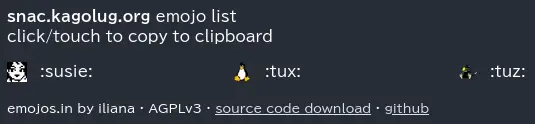
これで :susie:, :tux:, :tuz: の3つの絵文字が利用できるようになりました.
toot して確認できます.
もしくは以下のようなサイトでMastodon カスタム絵文字API経由で絵文字一覧を確認することも出来ます.
 ]
]
snac のカスタム絵文字についての詳細はsnac(8) を参照してください.
Custom Emojis From version 2.51, support for customized Emojis in posts is available (previously, they were hardcoded). Emojis are read from the emojis.json file in the instance base directory, as a JSON object of key / value pairs (if this file does not exist, it will be created with the predefined set). Each key in the object contains the text to be found (e.g., the :-) for a smiling face), and its associated value, the text string that will replace it (in this example case, the HTML entity for the Unicode codepoint for the smiley or the Emoji itself as text).Emoji values can also be URLs to image files; in this case, they will not be substituted in the post content, but added to the 'tag' array as an ActivityPub standard 'Emoji' object (it's recommendable that the Emoji key be enclosedin colons for maximum compatibility with other ActivityPub implementations, like e.g. :happydoggo:). These images can be served from an external source or from the static directory of the instance admin.If you want to disable any Emoji substitution, change the file to contain just an empty JSON object ({}).