![[?]](https://snac.matoken.org/matoken/s/avatar-c563dfcc7dea31d64b24b3aff1a3b746.jpeg)
$ cha https://snac.matoken.org/matoken/admin
cha: Error: cookie stream broken
Cloudflareの速度テストをTUIで – matoken's blog https://matoken.org/blog/2025/12/31/cloudflare-speed-test-with-tui/
![[?]](https://fed.brid.gy/static/bridgy_logo_square.jpg)
Heads up all, bridging to Bluesky isn’t working right now, their relay and/or appview aren’t ingesting our events. Still trying to figure out if we can do anything about it, or whether they need to nudge something on their side. Sorry for the trouble, hope to get it sorted out soon!
プロセスの情報をわかりやすく表示してくれるwitr – matoken's blog https://matoken.org/blog/2025/12/29/witr_-why-is-this-running/
6kちょい
Rakuten Hand 5Gの修理・交換手続き方法 | Rakuten Hand 5Gサポート情報 | Rakuten Hand 5G | Android | 製品 | 楽天モバイル
https://network.mobile.rakuten.co.jp/product/smartphone/rakuten-hand-5g/support/repair/
ビル天井裏の「古い配線」がIoT化の壁に、パナソニック発の通信技術「Nessum」が解決策に? - CNET Japan https://japan.cnet.com/article/35241678/
公衆電話自体はこの辺のコンビニにはほぼあるけど
公衆電話ボックスにOpenRoaming対応Wi-Fi、東京都とNTT東が第1号の運用開始|BUSINESS NETWORK https://businessnetwork.jp/article/32213/
sergiolepore/ChristBASHTree: Just a Christmas tree https://github.com/sergiolepore/ChristBASHTree
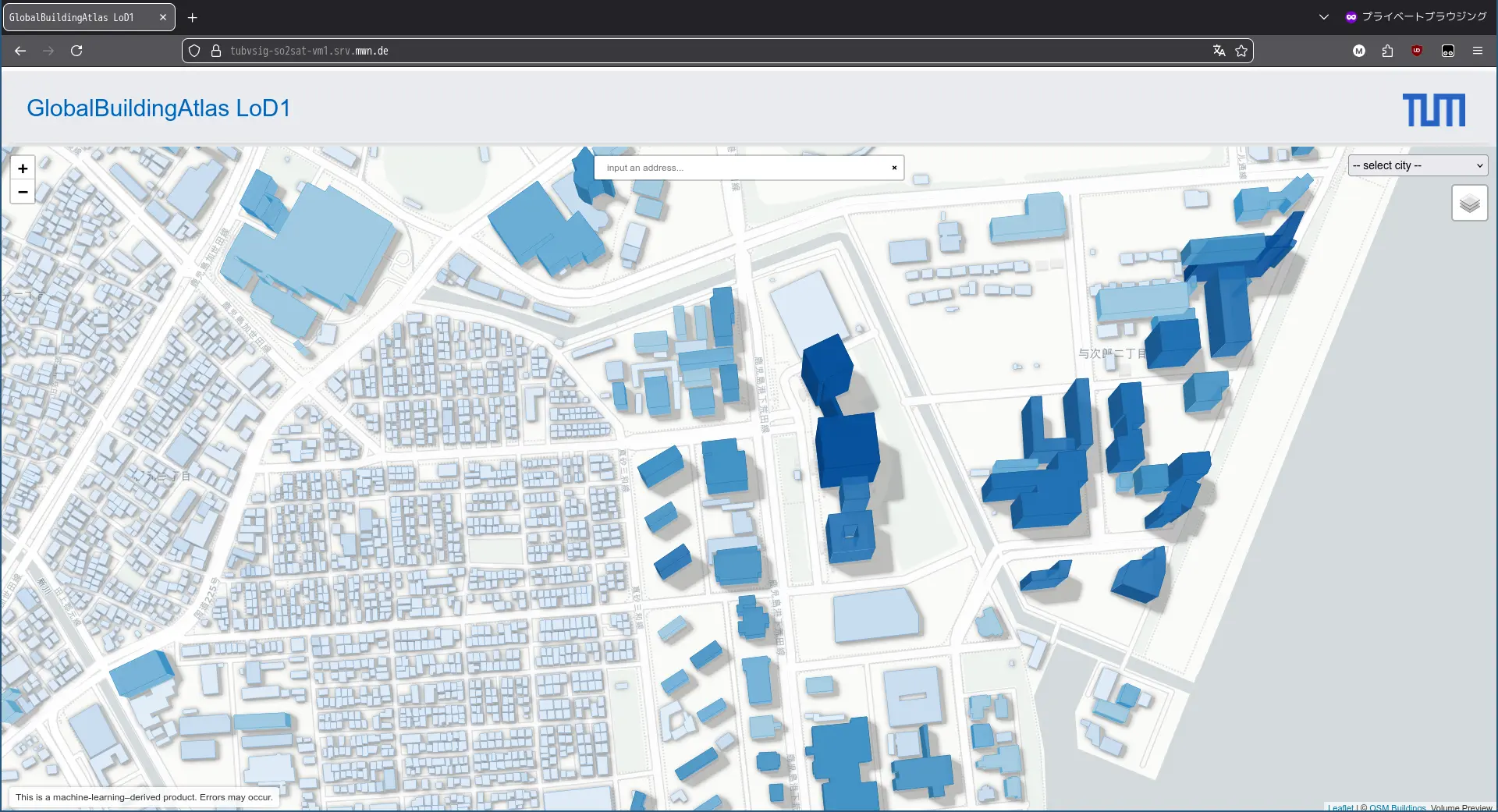
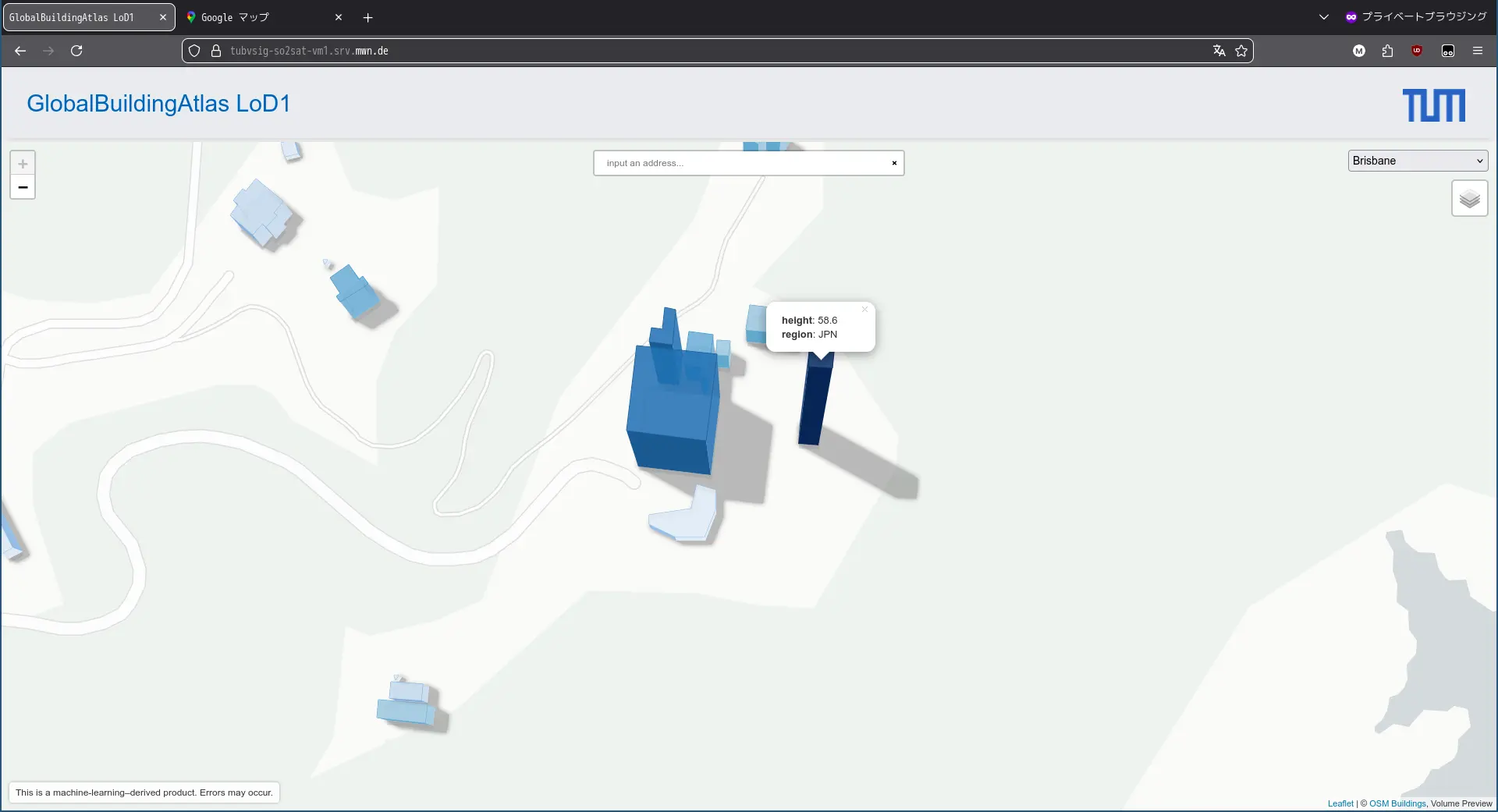
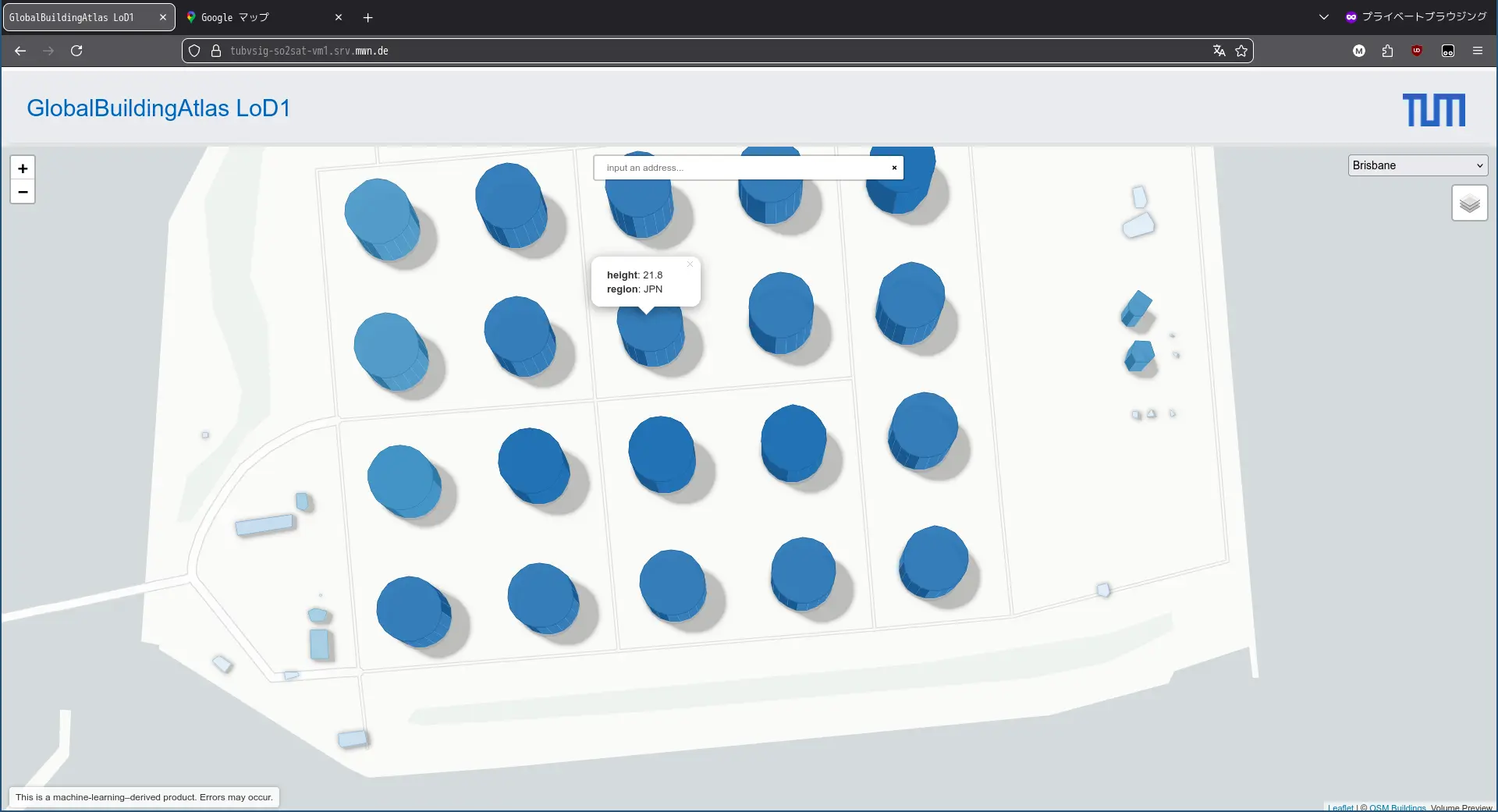
解像度3x3m てことでうちのあたりの過疎地の民家も出てくる
畑の小屋とかも
公園のトイレも出てきたり来なかったり
東屋も3x3m 以上ありそうだけど数件見ると無い
添付画像1枚目は鹿児島県庁のあたり.左上のはたしか最近解体された旧ダイエーも
2枚目はjaxa usc のイプシロンロケットなんかを打ち上げるMセンター.組み立て等や射場がわかる
3枚目は志布志国家石油備蓄基地.シーバースや浮標は出てこない
建物クリックで高さが出てくるけど地形のせいで大分ずれてるなて感じのとこも多い
ミュンヘン工科大学、地球上の27.5億の建物を網羅する高解像度の3Dデータセット「GlobalBuildingAtlas」公開! 2019年の衛星画像を使用して作成された3×3mの建物モデル https://cgworld.jp/flashnews/01-202512-GlobalBuildingAtlas.html
Alt...
鹿児島県庁周辺
Alt...
USC Mセンター
Alt...
志布志国家石油備蓄基地
JAXA | H3ロケット8号機の打上げ失敗原因調査状況について(宇宙開発利用部会(第101回)/調査・安全小委員会(第57回) ) https://www.jaxa.jp/press/2025/12/20251223-1_j.html

昔はパソコンショップでいっぱい見かけたものでした🐒
「バザールでござーる」あと1年でサヨナラでござーる 35周年の節目に引退へ - ITmedia NEWS https://www.itmedia.co.jp/news/articles/2512/22/news121.html
打上げ日 : 2025年12月22日(月)JAXA | H3ロケット8号機による「みちびき5号機」の打上げ時刻及び打上げ時間帯[再設定(その2)] https://www.jaxa.jp/press/2025/12/20251220-1_j.html
打上げ時刻 : 10時51分30秒
...
Michibiki 5 | H3-22S | Next Spaceflight https://nextspaceflight.com/launches/details/7078/
...
JAXA | H3ロケット8号機の打上げについて(第一報) https://www.jaxa.jp/press/2025/12/20251222-1_j.html
JAXA | H3ロケット8号機の打上げ失敗及び対策本部の設置 https://www.jaxa.jp/press/2025/12/20251222-2_j.html
![[?]](https://secure.gravatar.com/avatar/1865f695c4eecc844385acef2f078255036adccd42c254580ea3844543ab56d9?s=120&d=mm&r=g)
鹿児島Linux勉強会2025.12に参加
鹿児島らぐというLinux User Group で月一を目標に.「鹿児島Linux勉強会」という勉強会をしています. 鹿児島らぐ(Linux User’s Group) 鹿児島Linux勉強会 2025.12(オンライン開催) - connpass 最近はセルフホストしたビデオミーティングソフトウェアなどを利用してBoFやアンカンファレンスのような形式でネタのある人が発表,それにツッコミを入れていくような感じです. […] [SENSITIVE CONTENT]
鹿児島らぐというLinux User Group で月一を目標に.「鹿児島Linux勉強会」という勉強会をしています.
最近はセルフホストしたビデオミーティングソフトウェアなどを利用してBoFやアンカンファレンスのような形式でネタのある人が発表,それにツッコミを入れていくような感じです.
12月の「鹿児島Linux勉強会 2025.12」では以下のような話題で盛り上がりました.
初代EchoShow5のTermuxを便利に使う
最近参加したイベントレポート
自分は「ActivityPub Server の snac その3」として10月,11月に発表したActivityPub Server のsnac の続きの話をしました.
このときの資料はこちら
鹿児島Linux勉強会次回は都市が変わって2026/01/18(日)の予定です.
まだ20包くらいあるけど買っとくかな
Amazon.co.jp: 【第2類医薬品】 by Amazon 葛根湯エキス[顆粒]S 30包 : ドラッグストア https://www.amazon.co.jp/dp/B0CVNW1RHR
アフェリエイトリンク https://amzn.to/4asbZBt
イタリアの X.org スポット – matoken's blog https://matoken.org/blog/2025/10/11/x-org-spotted-in-italy/
![[?]](https://snac.kagolug.org/susie.png)
鹿児島の天気は雨,予報通り昼には止んでほしいところ #kagolug
鹿児島Linux勉強会 2025.12(オンライン開催) - connpass https://kagolug.connpass.com/event/376238/
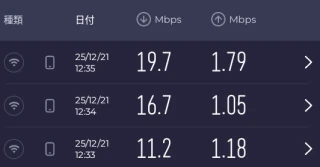
まあUp は変わらない
$ speedtest-cli --simple
Ping: 90.122 ms
Download: 8.60 Mbit/s
Upload: 1.60 Mbit/s
Alt...
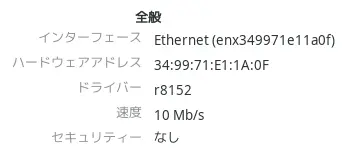
10Mbps
snacとBluesky連携
さくらのナレッジに軽量ActivityPub Server のsnac についての記事を寄稿しました. さくらインターネットのさくらのナレッジにsnacの記事を寄稿 – matoken’s blog ここに書かなかったsnac のことをいくつか書いていこうと思います. 今日はsnac とBluesky 連携について. […] [SENSITIVE CONTENT]

さくらのナレッジに軽量ActivityPub Server のsnac についての記事を寄稿しました.
ここに書かなかったsnac のことをいくつか書いていこうと思います.
今日はsnac とBluesky 連携について.
Bluesky はポストTwitter の一つでAT Protocol を利用した分散型SNS です.とはいえ現時点ではActivityPub ほど分散している感じはしません.
このBluesky とfediverse (snac のActivityPub も含む)とWeb を連携させるブリッジとしてBridgy Fed というサービスがあります.
Bridgy Fed を使ってsnac とBluesky を連携してみます,
Bridgy Fed for the fediverse (@ap.brid.gy) — Bluesky (Bluesky アカウント)
ActivityPub から連携するには https://fed.brid.gy/login で認証後,「Enable」ボタンを押すとなっているのですがログインしてもボタンが見当たりません.Mastodon としてsnac のアカウントを認証したのでなにかAPI の違いや不足があるのかもしれません.
以下のページを見ると別の方法も紹介されています.
if login isn't supported for your fediverse server, search for and follow @bsky.brid.gy@bsky.brid.gy in the fediverse. That account will then follow you back. Accept its follow to make sure your fediverse posts get sent the bridge and make it into Bluesky. You can unfollow it afterward if you want, you'll still stay bridged. (Here's how to disable.)
snac の該当アカウントで @bsky.brid.gy@bsky.brid.gy をfollow します.するとこのアカウントからfollow が返されるので承認すると連携完了です.この後は unfollow しても連携は維持されるそうです.
このときの連携元アカウントが, @[user]@[instance] の場合Bluesky ブリッジアカウントのハンドルは [user].[instance].ap.brid.gy になります.
なにか投稿して確認しましょう.
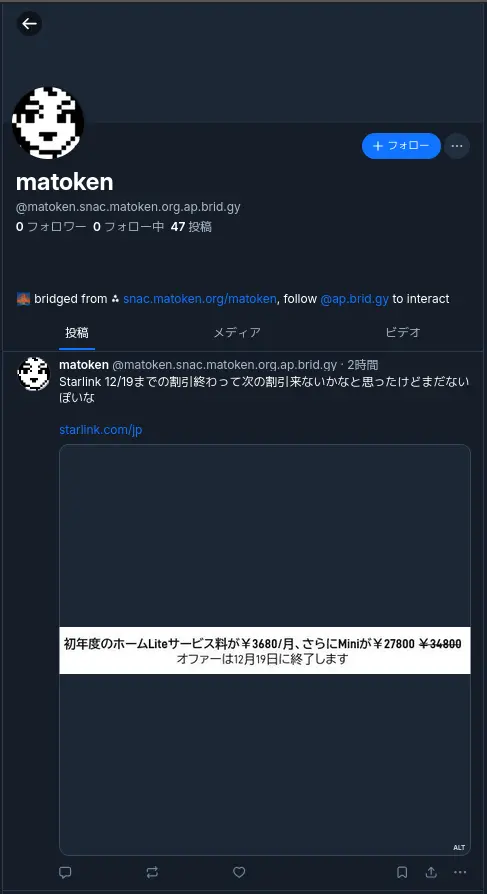
Bridgy Fed は単に投稿を転送するだけでなく返信やlikes, (元の投稿がブリッジされている場合は)repost なども連携されるようです.元の投稿を削除した場合も反映されます.
Which stuff of mine from the fediverse will get bridged?
Once you’ve enabled the bridge, anything that’s fully public and interacts with Bluesky users. This includes your posts, replies, likes, and reposts if the original post was bridged. Posts on Bluesky are limited to 300 characters, so longer posts from the fediverse are truncated and ellipsized. Hashtags, links, link previews, images, videos, and even alt text are also included.
— Which stuff of mine from the fediverse will get bridged?
ブリッジアカウントの削除を行いたい場合は,Bridgy Fedボットユーザー( @bsky.brid.gy@bsky.brid.gy )をブロックすることで削除できるようです.
If you’re on the fediverse or Bluesky, and you’ve opted in but now want to opt out, block the Bridgy Fed bot user for the network you want to opt out of. For example, on the fediverse, block @bsky.brid.gy@bsky.brid.gy. On Bluesky, block @ap.brid.gy.
(However, if you’re on a Pixelfed instance, DM the word stop to @bsky.brid.gy@bsky.brid.gy instead. Pixelfed doesn’t yet send the ActivityPub Block activity, so blocking won’t work. Hopefully they’ll fix that soon!)
If you’re on the web, email us from an address at your web site’s domain to show that you own it, or you can put the text #nobridge in the profile on your home page and then update your profile on your user page.
Once you’ve done this, Bridgy Fed will deactivate your bridged profile in that network, and it will no longer bridge any of your posts or interactions there.
You can undo this later and reactivate bridging for your account, but depending on the network, not everything will be perfectly restored. For example, when you disable bridging into the fediverse, the bridged fediverse account is deleted and all followers are disconnected. If you later re-enable it, fediverse users will have to search for your account by address manually to find and follow it again.
snacの自動投稿機能
さくらのナレッジに軽量ActivityPub Server のsnac についての記事を寄稿しました. さくらインターネットのさくらのナレッジにsnacの記事を寄稿 – matoken’s blog ここに書かなかったsnac のことをいくつか書いていこうと思います. 今日はsnac のbot 向け投稿機能について. […] [SENSITIVE CONTENT]
さくらのナレッジに軽量ActivityPub Server のsnac についての記事を寄稿しました.
ここに書かなかったsnac のことをいくつか書いていこうと思います.
今日はsnac のbot 向け投稿機能について.
bot やアナウンスなど向けのアカウントで自動投稿をしたいことがあります.
例えばいま考えているのはCalDav から今日のイベントを投稿するアカウント.現在はWebhook 経由でDiscord にpost したりしています.
snac でもいくつか自動投稿する機能があります.
Implementing post bots
snac makes very easy to post messages in a non-interactive manner. This example posts a string:
uptime | snac note $SNAC_BASEDIR $SNAC_USER –
You can setup a line like this from a crontab(5) or similar. Take note that you need a) command-line access to the same machine that hosts the snac instance, and b) write permissions to the storage directories and files.
You can also post non-interactively using the Mastodon API and a command-line http tool like curl(1) or similar. This has the advantage that you can do it remotely from any host, anywhere; the only thing you need is an API Token. This is an example:
curl -X POST https://$SNAC_HOST/api/v1/statuses \
–header “Authorization: Bearer ${TOKEN}” -d “status=$(uptime)”You can obtain an API Token by connecting to the following URL:
— man(1) より
note basedir uid text [file file ... [-r inReplyTo [-d YYYYmmddHHMMSS]]]
        Enqueues a Create + Note message to all followers. If the text argument is -e, the external editor defined by  the  EDITOR  environment  variable
        will  be invoked to prepare a message; if it's - (a lonely hyphen), the post content will be read from stdin.  The rest of command line arguments
        are treated as media files to be attached to the post. The LANG environment variable (if defined) is used as the post language. An  optional  URL
        to  a  Fediverse post, prefixed by -r, can be specified for this note to be a reply to. If a date in YYYYmmddHHMMSS format is followed by -d, the
        note is scheduled for that moment instead of immediately posted (this date must be in the same timezone the user has configured in the web UI).
note_unlisted basedir uid text [file file ... [-r inReplyTo [-d YYYYmmddHHMMSS]]] Like the previous one, but creates an "unlisted" (or "quiet public") post.note_mention basedir uid text [file file ... [-r inReplyTo [-d YYYYmmddHHMMSS]]] Like the previous one, but creates a post only for accounts mentioned in the post body.block basedir instance_url
— man(1) より
snac note コマンドでの投稿
snac の動作している環境で実行できるのであればお手軽なsnac のnote コマンドがあります.
man(1) にある例を真似してみます.
uptime | snac note $SNAC_BASEDIR $SNAC_USER –
$ uptime | pee "./snac note snac-test test -" cat
 23:32:36 up 4 days, 10:17,  1 user,  load average: 1.56, 1.90, 1.69
23:32:36 [test] enqueue_message http://127.0.0.1:8001/test/p/1766154756.511450/Create
8       /�
投稿を確認するとこんな感じ.

日本語もそのままでok でした.

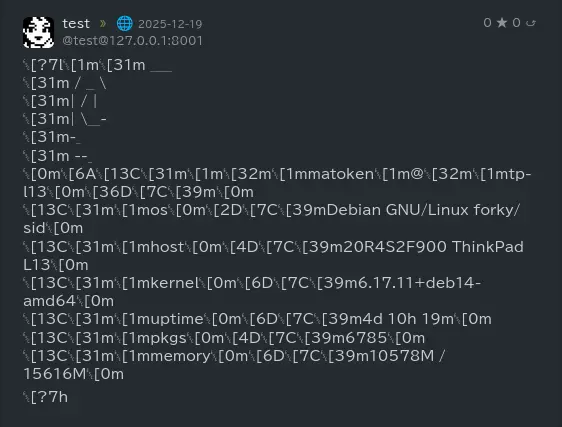
pfetch を流し込んでみるとこんな感じで整形を考えないとダメそう.
curl を使ってAPI 経由で投稿
こちらは一般的なネットワーク経由でリモートで投稿可能な方法です.token を入手してcurl コマンドで投稿します.
まず以下のようなURL でtoken を取得します.
以下のような画面になるので対象アカウントの情報を入手します.
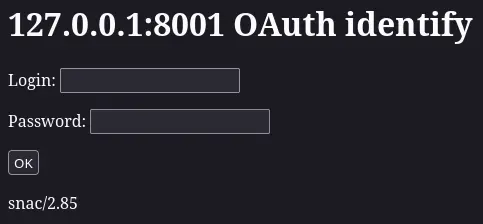
以下のようなトークンが取得できるのでメモします.
1f3ea50e9ab7cc85f5ff01b8f43fb1ae
後はcurl などで以下のようにPOST.
json で返り値が帰ってきます.
$ curl -X POST http://127.0.0.1:8001/api/v1/statuses --header "Authorization: Bearer 1f3ea50e9ab7cc85f5ff01b8f43fb1ae" -d "status=$(uptime)"
{
    "id": "1766155742b0f5ed692a273ff5b6ef59b696ddde76",
    "uri": "http://127.0.0.1:8001/test/p/1766155742.788170",
    "url": "http://127.0.0.1:8001/test/p/1766155742.788170",
    "account": {
        "id": "488d5ffe15e31aa0be5002853e8006f7",
        "username": "test",
        "display_name": "test",
        "discoverable": true,
        "group": false,
        "hide_collections": false,
        "indexable": true,
        "noindex": false,
        "roles": [
        ],
        "acct": "test@127.0.0.1:8001",
        "created_at": "2025-11-14T19:38:38Z",
        "last_status_at": "2025-12-19",
        "bot": false,
        "note": "<br>",
        "url": "http://127.0.0.1:8001/test",
        "uri": "http://127.0.0.1:8001/test",
        "avatar": "http://127.0.0.1:8001/susie.png",
        "avatar_static": "http://127.0.0.1:8001/susie.png",
        "header": "",
        "header_static": "",
        "emojis": [
        ],
        "locked": false,
        "followers_count": 0,
        "following_count": 0,
        "statuses_count": 0,
        "fields": [
        ]
    },
    "created_at": "2025-12-19T14:49:02.000Z",
    "content": "23:49:02 up 4 days, 10:34,  1 user,  load average: 1.48, 1.57, 1.68<br>",
    "visibility": "public",
    "sensitive": false,
    "spoiler_text": "",
    "media_attachments": [
    ],
    "mentions": [
    ],
    "tags": [
    ],
    "emojis": [
    ],
    "favourites_count": 0,
    "favourited": false,
    "reblogs_count": 0,
    "reblogged": false,
    "replies_count": 0,
    "in_reply_to_id": null,
    "in_reply_to_account_id": null,
    "reblog": null,
    "card": null,
    "language": "en",
    "filtered": [
    ],
    "muted": false,
    "text": " 23:49:02 up 4 days, 10:34,  1 user,  load average: 1.48, 1.57, 1.68",
    "edited_at": null,
    "poll": null,
    "bookmarked": false,
    "pinned": false
}